DRF Theme
Django-CFG’s DRF Theme replaces the default Bootstrap-based Browsable API with a modern, schema-aware interface. It subclasses BrowsableAPIRenderer, so every existing DRF behaviour is preserved — but on top of the live response it layers an endpoint navigator, a typed request console, OpenAPI-driven example responses, and an auth panel with ready-made code snippets.
Think of it as Swagger UI’s interactivity + Redoc’s reading experience, rendered inline on your own endpoints, with no separate spec page and no build step.
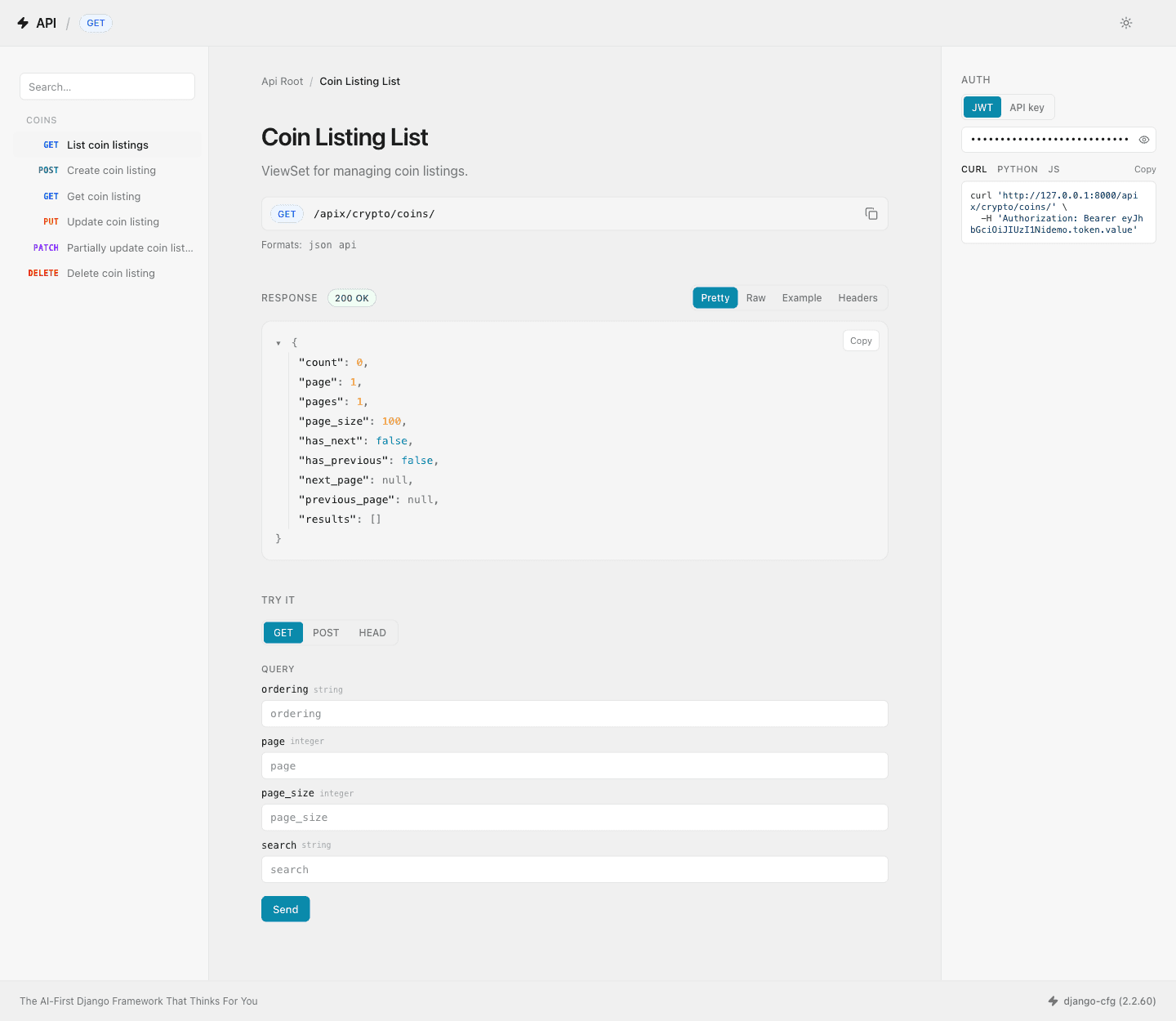
Zero configuration. Enabled by default (enable_drf_tailwind=True). It reads the same drf-spectacular schema you already generate for your TypeScript clients — nothing extra to wire up.
Why not just Swagger UI or Redoc?
Swagger UI and Redoc are excellent, but they are separate documentation surfaces you host alongside your API. The DRF Theme renders on the endpoint itself — the same URL a developer hits returns the live response and the explorer UI. Below is an honest, feature-level comparison.
| Capability | DRF Theme | Swagger UI | Redoc (OSS) |
|---|---|---|---|
| Renders on the endpoint (live data) | ✅ | ❌ separate page | ❌ separate page |
| Live “Try it” requests | ✅ typed fetch | ✅ | ❌ (premium only) |
| Auto code snippets (curl / Python / JS) | ✅ | ❌ | ❌ (premium / manual x-codeSamples) |
| Example response from schema | ✅ client-side mock | ✅ | ✅ |
| Endpoint navigation sidebar | ✅ grouped by resource | ✅ by tag | ✅ by tag |
| Auth UX | ✅ JWT / API-key, persisted | ✅✅ (+ OAuth2 flows) | ❌ read-only |
| Native dark mode | ✅ | ❌ (custom CSS) | ❌ (premium CSS vars) |
| Build step / bundle | none (CDN + Alpine) | dist / CDN | ~300 KB bundle |
| CORS to worry about | ❌ same-origin | ⚠️ common failure | n/a |
| Deep-linking to operations | ❌ | ✅ | ❌ (premium) |
| OAuth2 authorization flows | ❌ | ✅ | n/a |
Where this lands: the DRF Theme beats open-source Redoc outright (OSS Redoc is documentation-only — no live requests) and matches Swagger UI on interactivity, while adding auto-generated code snippets and native dark mode that both charge for or omit. Swagger UI still wins on OAuth2 flows and deep-linking — see Limitations.
Sources: Swagger UI configuration , Swagger UI CORS , Redocly premium vs open-source , Redoc GitHub .
Features
- Endpoint navigation — a left sidebar built from your OpenAPI schema: operations grouped by resource, with human-readable names derived from
summary/operationId. The default DRF Browsable API has no navigation at all. - Typed “Try it” console — path, query and body fields are read from the schema (with
requiredmarkers and types) and the request is sent withfetch, no page reload. The stored auth header and CSRF token are attached automatically. - Example responses from the schema — a synthetic
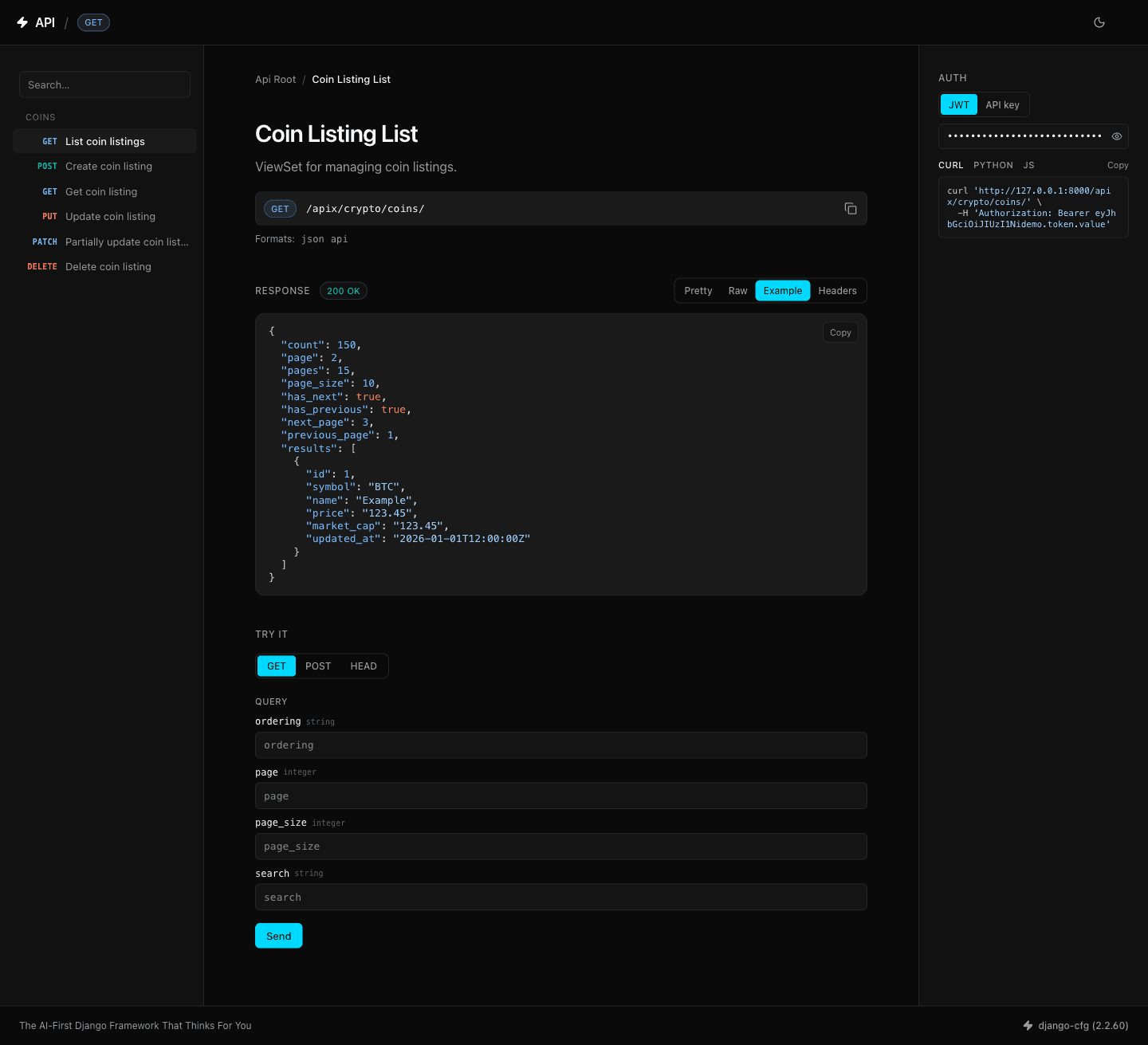
200/201body is generated client-side from the OpenAPI schema (resolving$ref, arrays, nested objects,enum/example/default, with bounded recursion). The response shape is visible even when the database is empty — no faker, no DB hit. - Auth panel + code snippets — toggle between JWT (Bearer) and API-key, store the token in
localStorage, and copy ready-made curl / Python / JavaScript snippets with the token woven in. - Native dark / light / auto mode — three-mode switch persisted in the
themecookie; auto follows the systemprefers-color-scheme. Applied before first paint to avoid a flash. - Design tokens from
@djangocfg/ui-core— the same semantic colour tokens (cyan primary) as the rest of the Django-CFG frontend, in both light and dark. - Syntax-highlighted JSON — highlight.js for raw responses and snippets, plus an interactive collapsible JSON tree for the “Pretty” view.
- No build step — Tailwind CSS v4 (Play CDN) + Alpine.js + highlight.js + Lucide icons, all from CDN. Nothing to compile.
The Example tab below shows a synthetic response built entirely from the OpenAPI schema — the database is empty, yet the full paginated shape and field types are visible (dark mode shown):
Quick Start
Enabled by default. To be explicit, or to switch it off:
from django_cfg import DjangoConfig

class MyConfig(DjangoConfig):
    enable_drf_tailwind = True   # default — no extra configuration needed
To configure DRF renderer classes explicitly:
from django_cfg.models.api.drf import DRFConfig

class MyConfig(DjangoConfig):
    drf = DRFConfig(
        renderer_classes=[
            "rest_framework.renderers.JSONRenderer",
            "django_cfg.modules.django_drf_theme.TailwindBrowsableAPIRenderer",
        ]
    )
To revert to the stock Bootstrap theme:
class MyConfig(DjangoConfig):
    enable_drf_tailwind = False
How it works
The renderer subclasses DRF’s BrowsableAPIRenderer and adds a few context variables; everything interactive is then driven client-side by small JavaScript modules that lazily fetch the drf-spectacular schema for the current API group.
Request  →  TailwindBrowsableAPIRenderer
              ├─ live response data        (from your viewset, as always)
              ├─ theme        (cookie)
              └─ schema_url / group_name   (derived from the URL path)
                       │
                       ▼
            Browser fetches /cfg/openapi/{group}/schema/  (once, lazily)
                       │
        ┌──────────────┼───────────────────────────┐
        ▼              ▼                             ▼
  endpoint nav    request console            example response
  (sidebar)       (typed "Try it")           (mock from schema)
Schema resolution
The renderer maps the request path to its OpenAPI group and schema URL using the Django-CFG convention:
- API endpoints live at
/{api_prefix}/{group}/... - The matching schema lives at
/cfg/openapi/{group}/schema/(orreverse('openapi-schema-{group}')when that route name exists).
If the group can’t be derived (for example the API root), schema-driven features degrade gracefully — the live response and theming still work, but navigation, the typed console, and example responses are simply hidden.
TailwindBrowsableAPIRenderer
Template: rest_framework/tailwind/api.html
Added context variables:
| Variable | Source | Used by |
|---|---|---|
theme | theme cookie (default "auto") | Pre-paint theme + switcher |
group_name | derived from the URL path | Schema resolution |
schema_url | /cfg/openapi/{group}/schema/ | Endpoint nav, console, example |
allowed_methods_json | DRF allowed methods minus OPTIONS, as JSON | Request console method picker |
Template structure
Everything is decomposed into small, overridable components:
templates/rest_framework/tailwind/
├── base.html                      # Shell: navbar, content frame, footer, toasts
├── api.html                       # 3-column layout: nav · main · sidebar
└── components/
    ├── head.html                  # CDN tags + design-token mapping
    ├── navbar.html                # Branding, theme switcher, user
    ├── endpoint_nav.html          # Left sidebar — schema-driven nav
    ├── response_viewer.html       # Pretty / Raw / Example / Headers tabs
    ├── request_console.html       # Typed "Try it" panel
    ├── auth.html                  # JWT / API-key + code snippets
    ├── sidebar.html               # Right sidebar (Auth)
    ├── pagination.html            # Pager
    ├── footer.html
    └── toasts.html
Override any template by placing a file at the same relative path inside your app’s templates/ directory.
The interactive behaviour lives in static/django_drf_theme/js/ as independent Alpine modules — schema.js (shared OpenAPI helpers), endpoint-nav.js, request-console.js, response-viewer.js, json-viewer.js, and app.js (theme, toasts, auth, snippets).
Tailwind v4 Play CDN has no @apply and no @layer components. All styling is plain utility classes in the markup. The only custom CSS the CDN needs is the class-based dark variant (@variant dark) and the @theme inline token mapping in head.html. Static design tokens for JS-generated nodes live in static/django_drf_theme/css/drf-theme.css.
Template tags
Load via {% load tailwind_tags %}.
| Filter | Description |
|---|---|
|method_badge | Full Tailwind class string for an HTTP-method pill (GET, POST, …) |
|status_badge | Full Tailwind class string for a response-status pill (colour by 2xx/4xx/5xx) |
|add_class:"classes" | Adds a CSS class to a bound form field’s widget |
{% load tailwind_tags %}
<span class="{{ request.method|method_badge }}">{{ request.method }}</span>
<span class="{{ response.status_code|status_badge }}">{{ response.status_code }}</span>
Theme detection
The theme is resolved in this order:
- The
themecookie (set by the theme switcher). auto— follows the systemprefers-color-scheme.- Default:
auto.
Selecting light or dark in the switcher writes the theme cookie so the choice persists across reloads. The class is applied to <html> before first paint to avoid a flash of the wrong scheme.
Limitations
Honest about the gaps versus Swagger UI:
- No OAuth2 authorization flows. The auth panel supports Bearer (JWT) and API-key. If your API authenticates via OAuth2 (authorization-code/PKCE, implicit, client-credentials), use Swagger UI’s Authorize modal for that flow.
- No deep-linking to a single operation. Navigation is within one API group; you can’t yet share a URL that opens a specific operation.
- One group at a time. The sidebar covers the current group’s schema; there is no in-UI switcher across multiple schema groups (Swagger UI’s
urls[]dropdown). - Schema-dependent. Endpoint nav, the typed console, and example responses require a drf-spectacular schema for the group. Without one they’re hidden, and you fall back to the live response + theming.
See Also
TAGS: drf, browsable-api, openapi, swagger, redoc, tailwind, alpine DEPENDS_ON: [overview, groups]
 Django-CFG